Radiology, orthopaedics, surgery, internal medicine and other specialties
CT, MR and ultrasound for the referring doctor — without CDs
Upload the patient’s CD, DVD or USB stick at once, and the referring doctor views it series by series, with a matching window, in the browser — on a computer or a phone.
Register your practice Viewing doctors: free Download the brochure (PDF)
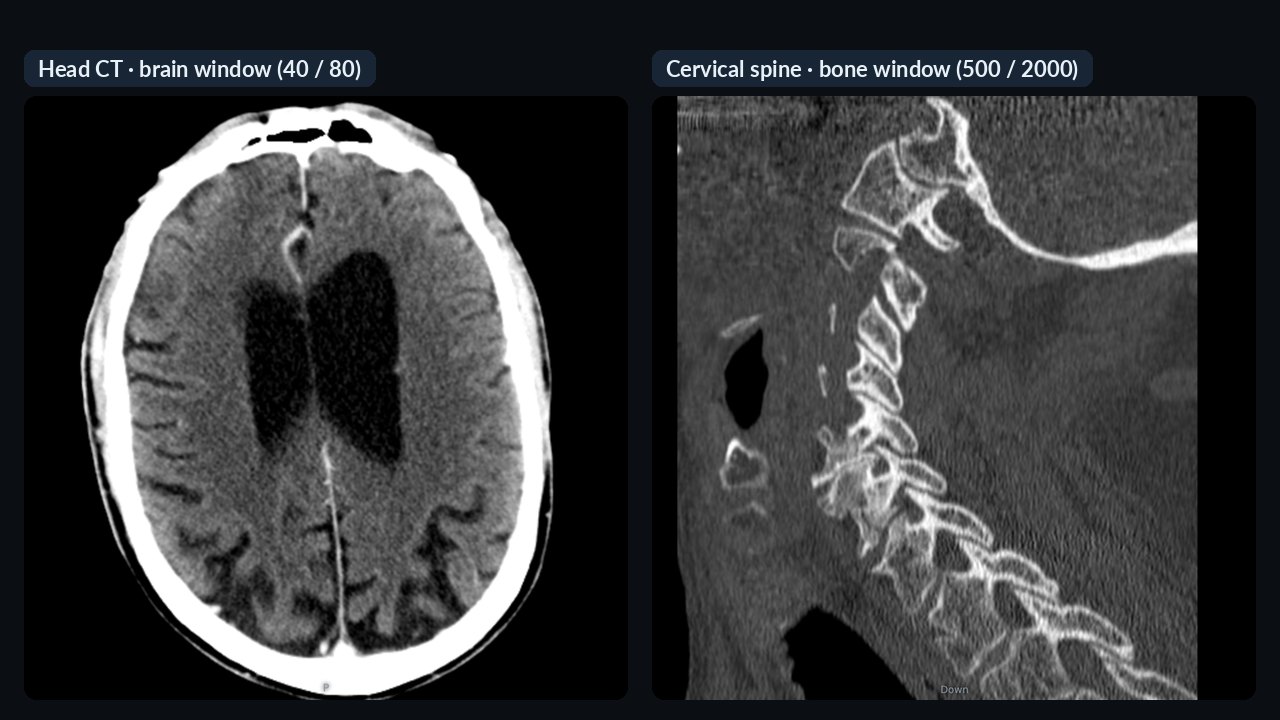
CT with all its series — and a matching window
Every series of the study is in the “Series” menu. The viewer picks the window itself, from the CT scanner’s suggestion or the series name — brain window for the brain, bone window for the bone series.
- Preset windows: brain, early stroke, blood, temporal bone, soft tissue, mediastinum, lung, liver, angio, spine, bone
- Change with one click
- Thick-slice series open in the acquisition plane

Thin slices in three planes, MIP
Thin-slice series open in three planes. Slab thickness and MIP help follow vessels and small nodules; distances can be measured in mm.
- Axial, coronal, sagittal views; double-click for one plane
- Slab thickness and MIP — vessels in one image
- Measurement (informational)

MR — echoes, b-values, phases separately
Every series of the MR study can be chosen separately: parts of multi-echo, diffusion and dynamic series are not lost. The window starts from the scan’s own setting.
- Up to 30 series per study
- Window presets suited to MR
- Multi-orientation series handled correctly
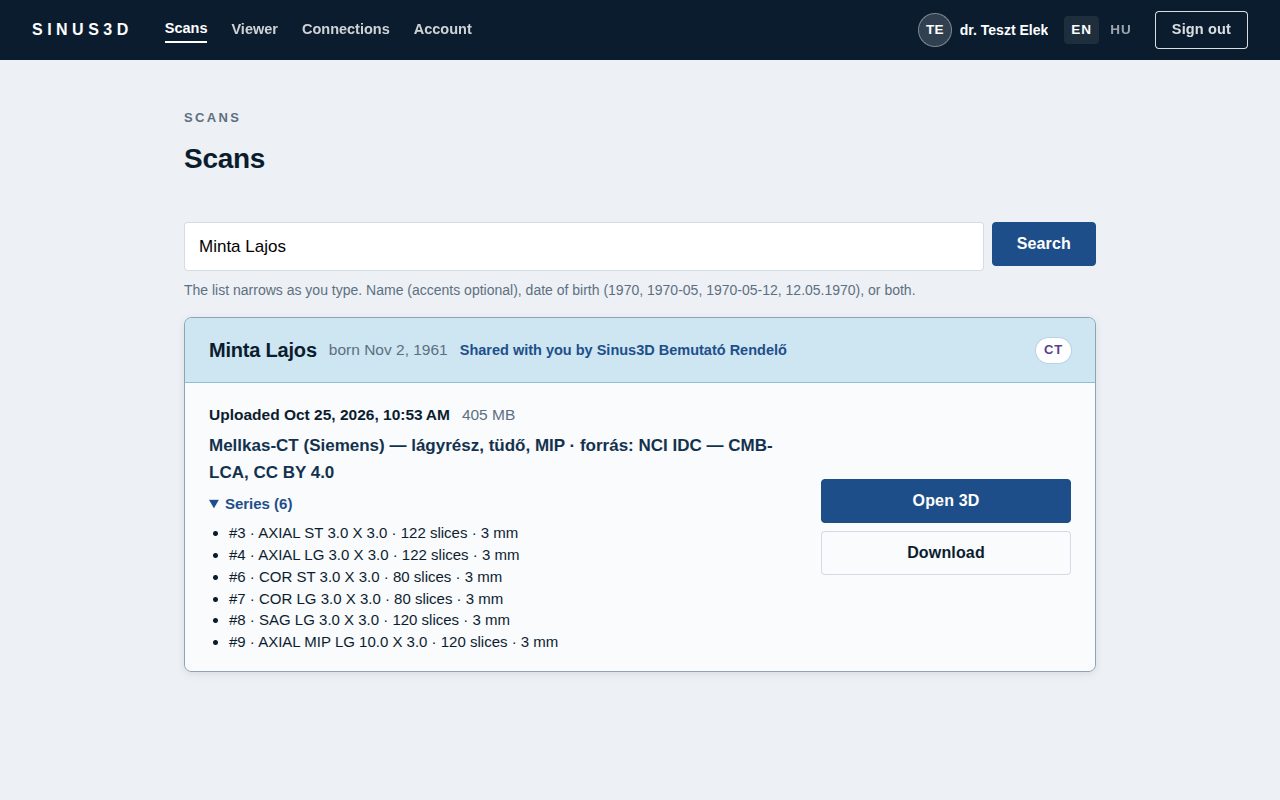
The series show in the list already
The study card unfolds the list of series, each opening directly. A summary of the series is added to the note automatically — so search finds it too, for example by “T2” or “STIR”.
- Open any series directly
- CT and MR in one study too
- Tell many studies apart quickly

Ultrasound and angiography as cine loops
Cine studies can be played, paused and stepped frame by frame. Colour (Doppler, contrast) ultrasound is shown in colour.
- Play, pause, step frame by frame
- Colour ultrasound in colour
- The original DICOM can be downloaded

The patient’s CD, DVD or USB stick at once — up to 20 GB
No need to know which file holds the images: simply select or drag in the whole disc. DICOM images are identified automatically; the viewer software and accompanying files are not uploaded. The upload starts as soon as you make your selection and runs while the disc is being read.
- Several patients on one disc: a clear warning before upload
- Handling of damaged or scratched discs: unreadable files are reported, the rest of the study uploads in full
- Duplicate detection: you are notified if the same study is already in the system
- Virus scanning on our own server, without third-party services

On the phone too
CT and MR open on the phone too: zoom with two fingers, double-tap to switch to one plane, scroll slices with the slider.
- Can be added to the home screen like an app
- Phone notification when a scan is sent
How does it work?
Upload
The practice uploads the scan — the device export, a folder or the patient’s whole CD. The patient’s name is filled in from the file.
Share
Choose who it was made for. The referring doctor is notified right away by e-mail or on their phone.
View
The referring doctor opens it in the browser, on a computer or a phone — no software, no CDs, no courier. The original DICOM can always be downloaded.
For the patient too
The patient can get an expiring link to their own scan; it opens only with their date of birth.
SSL Labs: A+ — connection encryption rated in the top category by the independent Qualys SSL Labs test (November 2026). Verify →
Frequently asked questions
How do I upload the patient’s CD?
Select the disc with the “Select CD or folder” button, or drag its contents in. DICOM images are identified automatically and other files are not uploaded. If the browser lets you select only one folder at a time, add the others with “+ Another folder”.
Why does one series open with a different window than another?
The viewer chooses the window closest to the CT scanner’s own suggestion or to the series name (e.g. “HEAD”, “LUNG”, “BONE”). It can be changed in the menu at any time.
Do I need to install software?
No. The CT, MR and ultrasound viewers run in the browser, on computers and phones.
How much does it cost?
Currently free for referring, viewing doctors. The practice or centre that uploads scans pays a monthly fee from HUF 9 900 (gross) — storage can be extended at any time.
Try it
Register as a practice — or as a referring doctor who views the scans sent to them: currently free of charge. After signing in, every feature can be tried on the demo practice’s sample scans.
Register your practice Working in another field? For dentists →
The viewers are informational; Sinus3D is not a medical device. For diagnosis, implant or surgical planning, open the original DICOM file in certified software. The pictures were made from public, freely licensed sample scans.